---
title: Run Pi with the Daytona Extension
description: Use the Daytona Pi extension to run every Pi tool call inside a remote Daytona sandbox, with each session synced to its own GitHub branch.
---
This guide demonstrates how to run the [Daytona Pi extension](https://www.npmjs.com/package/@daytona/pi) which integrates Daytona sandboxes and [Pi](https://pi.dev/). When the extension is active, the agent runs on your machine while every tool call — `bash`, file I/O, and search — runs inside a secure Daytona sandbox. Each session gets its own sandbox, and your work is synced to a per-session GitHub branch.
### 1. Workflow Overview
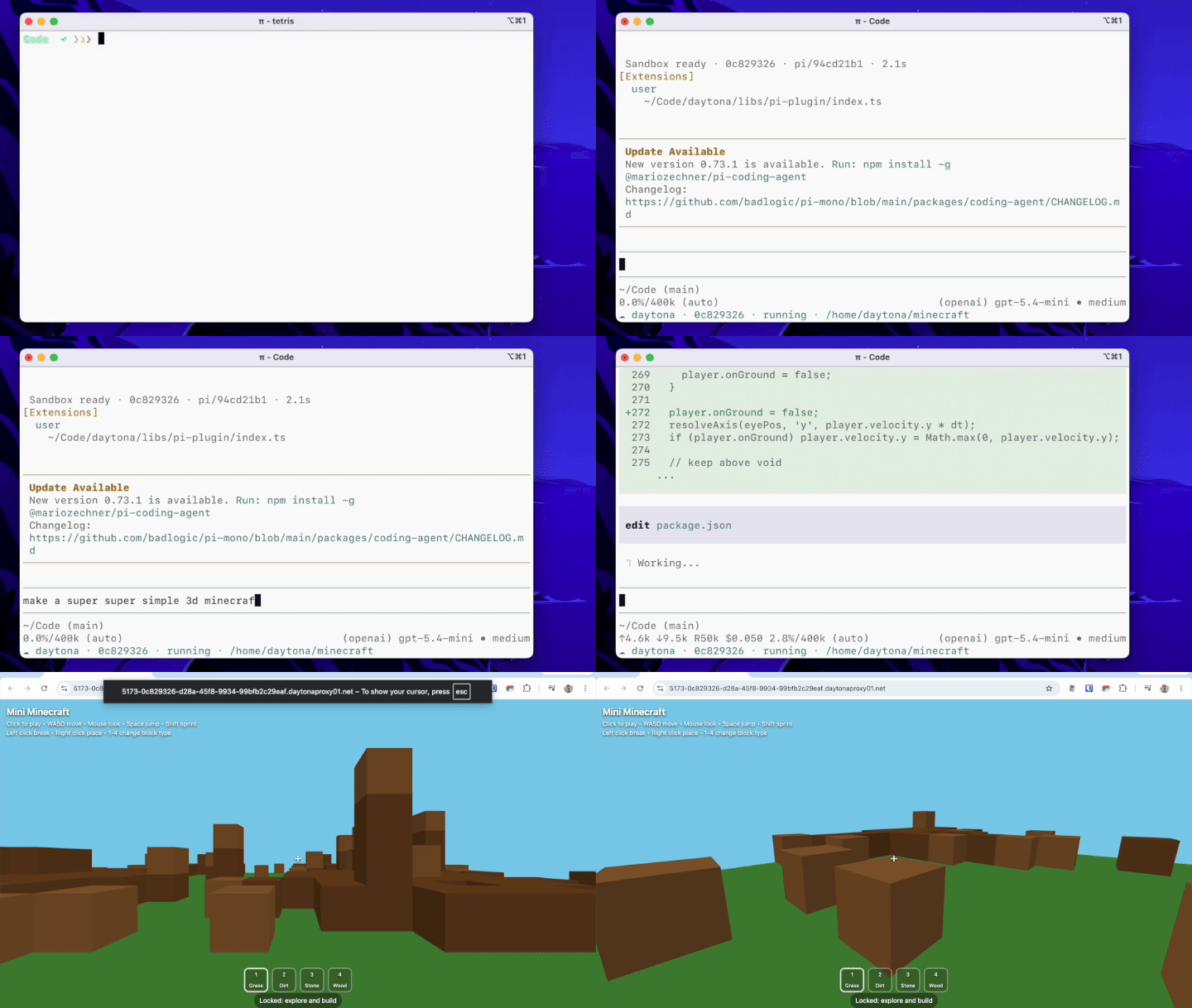
When you launch Pi with `--daytona`, a sandbox is created for the session and the repo you launched Pi in is cloned into it. From then on, every tool call — running code, installing dependencies, starting servers — happens in the sandbox rather than on your host.
 ### 2. Setup
#### Install Pi
Install Pi globally with npm:
```bash
npm install -g @earendil-works/pi-coding-agent
```
See the [Pi documentation](https://pi.dev/) for other install options.
#### Add the Extension
Add the Daytona extension to Pi:
```bash
pi install npm:@daytona/pi
```
To update it later, run `pi update` — `pi install` will not refresh an existing install.
#### Configure Environment
This extension requires a [Daytona account](https://www.daytona.io/) and [Daytona API key](https://app.daytona.io/dashboard/keys) to create sandboxes.
```bash
export DAYTONA_API_KEY="your-api-key"
```
If no key is set, Pi prompts you for one once per session. To enable GitHub branch sync, also authenticate the [GitHub CLI](https://cli.github.com/) (`gh auth login`).
#### Run Pi
Run Pi from inside a git repository:
```bash
cd my-project
pi --daytona
```
The repo you're in is cloned into the sandbox and your work is synced to a GitHub branch. Point at a different repository with `--repo`, or run outside a git repo for a blank workspace.
| Flag | Description |
| ------------------- | ----------------------------------------------------- |
| `--daytona` | Run tools inside a Daytona sandbox |
| `--repo ` | Git repo to clone (defaults to the repo you're in) |
| `--branch ` | Branch to clone (defaults to your current branch) |
| `--snapshot ` | Choose a Daytona snapshot / base image |
| `--public` | Create a public sandbox so preview URLs need no token |
| `--idle-stop ` | Minutes idle before the sandbox pauses (default 15) |
#### Slash commands
While Pi is running with `--daytona`, you can manage the active sandbox:
- `/sandbox` — show the active sandbox's status: state, working directory, branch, sync status, and its GitHub branch link
- `/github` — open this session's branch on GitHub
- `/compare` — open this session's branch compare view on GitHub
- `/merge` — merge this session's branch into its base on GitHub
- `/pr` — open a GitHub pull request for this session's branch
### 3. Understanding the Extension Architecture
The extension is a single Pi extension that splits work between your machine and the sandbox:
| | On your machine (host) | In the sandbox (Linux) |
| ----------------- | ------------------------------ | ---------------------------------------------------------------------------------- |
| **Agent & tools** | The agent (LLM, TUI, sessions) | File operations and commands (`bash`, `read`, `write`, `edit`, `ls`, `find`, `grep`) |
| **Git & GitHub** | GitHub authorization with `gh`, and `/merge` via the GitHub API | Git operations (clone and push) via the [Daytona git API](/docs/en/git-operations) |
A session flows through it like this:
1. **[Tool registration](#1-tool-registration)** — at startup, Pi's built-in tools are replaced with sandbox-backed versions, so every tool call runs in the sandbox.
2. **[Session start](#2-session-start)** — a sandbox is created for the session, or reattached when you resume it, and the repo is cloned in.
3. **[System prompt](#3-system-prompt)** — before the agent starts, the system prompt is pointed at the sandbox.
4. **[GitHub branch sync](#4-github-branch-sync)** — after each turn, the agent's commits are pushed to its branch.
5. **[Reconciliation](#5-reconciliation)** — after you delete a session, its orphaned sandbox is eventually reconciled and removed.
#### 1. Tool registration
Each built-in tool is re-registered so that, when a sandbox is active, it runs against it through the [Daytona SDK](https://www.npmjs.com/package/@daytona/sdk). A small `sandboxTool` helper wraps a local tool with a per-call rebuild against the active sandbox:
```typescript
// Wrap a local tool so it runs against the sandbox (rebuilt per call) when one is active.
function sandboxTool(local, makeRemote) {
return {
...local,
execute: (...args) => {
const active = requireSandbox(); // throws when --daytona is set but no sandbox; null when off
const tool = active ? makeRemote(active.cwd, active.sandbox) : local;
return tool.execute(...args);
},
};
}
pi.registerTool(sandboxTool(localBash, (cwd, sb) => createBashTool(cwd, { operations: createBashOps(sb) })));
```
`read`, `write`, `edit`, and `ls` are registered the same way with their own factories; `find` and `grep` run a dedicated search inside the sandbox.
#### 2. Session start
On `session_start` the extension reattaches the sandbox it created earlier for this session — so resuming restores your work — or creates a new one:
```typescript
pi.on("session_start", async (event, ctx) => {
const prev = lastSandboxFor(ctx); // recorded in a session entry on first run
active = prev
? await daytona.get(prev.sandboxId) // resume → reattach
: await daytona.create({
labels: { "created-by": "pi-daytona", "session-id": sessionId },
}); // new → create
});
```
With a GitHub repo, a new sandbox also gets the `pi/` branch created and cloned into it.
#### 3. System prompt
A `before_agent_start` hook rewrites the agent's working-directory line to the sandbox path and tells it to commit (but not push) its work:
```typescript
pi.on("before_agent_start", (event) => {
if (!active) return;
const cwdLine = `Current working directory: ${active.cwd} (Daytona sandbox ${shortId(active.sandbox.id)})`;
let systemPrompt = event.systemPrompt.replace(/Current working directory: .*/g, cwdLine);
systemPrompt +=
"\n\nThis project is a git repository inside a Daytona sandbox. After you finish a unit of work, " +
'commit it with git. Do not push — pushing is handled automatically.';
return { systemPrompt };
});
```
#### 4. GitHub branch sync
When you're in a github.com repo and authenticated with `gh`, each session gets its own branch. The host only uses `gh` to mint a token and call the GitHub REST API (to create the branch and merge it); all git transfer — clone, commit, push — runs **inside the sandbox** via the Daytona git API.
The agent commits its own work; after each turn the extension pushes any new commits to the branch:
```typescript
pi.on("agent_end", async () => {
if (!active?.git) return;
const token = await getGithubToken(pi);
const status = await active.sandbox.git.status(active.cwd);
if ((status.ahead ?? 0) > 0) {
await active.sandbox.git.push(active.cwd, "x-access-token", token);
}
});
```
When you're not in a github.com repo (or `gh` isn't authenticated), push is disabled — the sandbox still keeps a local git repo so the agent can commit, but nothing is pushed.
#### 5. Reconciliation
Pi has no "session deleted" event, so the extension reconciles: on `session_start` and `session_shutdown` it reaps any sandbox whose session no longer exists by comparing Daytona's labelled sandboxes against Pi's live sessions.
```typescript
async function reapOrphans(daytona) {
const live = new Set((await SessionManager.listAll()).map((s) => s.id));
for await (const sandbox of daytona.list({ labels: { "created-by": "pi-daytona" } })) {
const sessionId = sandbox.labels?.["session-id"];
if (sessionId && !live.has(sessionId)) await sandbox.delete();
}
}
```
So deleting a session from Pi's resume menu cleans up its sandbox on the next launch or exit.
**Key advantages:**
- Secure, isolated execution: every Pi tool call runs in a Daytona sandbox, and never on your host when `--daytona` is set
- One sandbox per session, reattached on resume and deleted only when you delete the session
- Optional GitHub branch sync: each session gets a `pi/` branch you can review and merge
- Live [preview links](/docs/en/preview/) when a server starts in the sandbox
- The agent's brain stays on your machine — only tool execution is remote
### 2. Setup
#### Install Pi
Install Pi globally with npm:
```bash
npm install -g @earendil-works/pi-coding-agent
```
See the [Pi documentation](https://pi.dev/) for other install options.
#### Add the Extension
Add the Daytona extension to Pi:
```bash
pi install npm:@daytona/pi
```
To update it later, run `pi update` — `pi install` will not refresh an existing install.
#### Configure Environment
This extension requires a [Daytona account](https://www.daytona.io/) and [Daytona API key](https://app.daytona.io/dashboard/keys) to create sandboxes.
```bash
export DAYTONA_API_KEY="your-api-key"
```
If no key is set, Pi prompts you for one once per session. To enable GitHub branch sync, also authenticate the [GitHub CLI](https://cli.github.com/) (`gh auth login`).
#### Run Pi
Run Pi from inside a git repository:
```bash
cd my-project
pi --daytona
```
The repo you're in is cloned into the sandbox and your work is synced to a GitHub branch. Point at a different repository with `--repo`, or run outside a git repo for a blank workspace.
| Flag | Description |
| ------------------- | ----------------------------------------------------- |
| `--daytona` | Run tools inside a Daytona sandbox |
| `--repo ` | Git repo to clone (defaults to the repo you're in) |
| `--branch ` | Branch to clone (defaults to your current branch) |
| `--snapshot ` | Choose a Daytona snapshot / base image |
| `--public` | Create a public sandbox so preview URLs need no token |
| `--idle-stop ` | Minutes idle before the sandbox pauses (default 15) |
#### Slash commands
While Pi is running with `--daytona`, you can manage the active sandbox:
- `/sandbox` — show the active sandbox's status: state, working directory, branch, sync status, and its GitHub branch link
- `/github` — open this session's branch on GitHub
- `/compare` — open this session's branch compare view on GitHub
- `/merge` — merge this session's branch into its base on GitHub
- `/pr` — open a GitHub pull request for this session's branch
### 3. Understanding the Extension Architecture
The extension is a single Pi extension that splits work between your machine and the sandbox:
| | On your machine (host) | In the sandbox (Linux) |
| ----------------- | ------------------------------ | ---------------------------------------------------------------------------------- |
| **Agent & tools** | The agent (LLM, TUI, sessions) | File operations and commands (`bash`, `read`, `write`, `edit`, `ls`, `find`, `grep`) |
| **Git & GitHub** | GitHub authorization with `gh`, and `/merge` via the GitHub API | Git operations (clone and push) via the [Daytona git API](/docs/en/git-operations) |
A session flows through it like this:
1. **[Tool registration](#1-tool-registration)** — at startup, Pi's built-in tools are replaced with sandbox-backed versions, so every tool call runs in the sandbox.
2. **[Session start](#2-session-start)** — a sandbox is created for the session, or reattached when you resume it, and the repo is cloned in.
3. **[System prompt](#3-system-prompt)** — before the agent starts, the system prompt is pointed at the sandbox.
4. **[GitHub branch sync](#4-github-branch-sync)** — after each turn, the agent's commits are pushed to its branch.
5. **[Reconciliation](#5-reconciliation)** — after you delete a session, its orphaned sandbox is eventually reconciled and removed.
#### 1. Tool registration
Each built-in tool is re-registered so that, when a sandbox is active, it runs against it through the [Daytona SDK](https://www.npmjs.com/package/@daytona/sdk). A small `sandboxTool` helper wraps a local tool with a per-call rebuild against the active sandbox:
```typescript
// Wrap a local tool so it runs against the sandbox (rebuilt per call) when one is active.
function sandboxTool(local, makeRemote) {
return {
...local,
execute: (...args) => {
const active = requireSandbox(); // throws when --daytona is set but no sandbox; null when off
const tool = active ? makeRemote(active.cwd, active.sandbox) : local;
return tool.execute(...args);
},
};
}
pi.registerTool(sandboxTool(localBash, (cwd, sb) => createBashTool(cwd, { operations: createBashOps(sb) })));
```
`read`, `write`, `edit`, and `ls` are registered the same way with their own factories; `find` and `grep` run a dedicated search inside the sandbox.
#### 2. Session start
On `session_start` the extension reattaches the sandbox it created earlier for this session — so resuming restores your work — or creates a new one:
```typescript
pi.on("session_start", async (event, ctx) => {
const prev = lastSandboxFor(ctx); // recorded in a session entry on first run
active = prev
? await daytona.get(prev.sandboxId) // resume → reattach
: await daytona.create({
labels: { "created-by": "pi-daytona", "session-id": sessionId },
}); // new → create
});
```
With a GitHub repo, a new sandbox also gets the `pi/` branch created and cloned into it.
#### 3. System prompt
A `before_agent_start` hook rewrites the agent's working-directory line to the sandbox path and tells it to commit (but not push) its work:
```typescript
pi.on("before_agent_start", (event) => {
if (!active) return;
const cwdLine = `Current working directory: ${active.cwd} (Daytona sandbox ${shortId(active.sandbox.id)})`;
let systemPrompt = event.systemPrompt.replace(/Current working directory: .*/g, cwdLine);
systemPrompt +=
"\n\nThis project is a git repository inside a Daytona sandbox. After you finish a unit of work, " +
'commit it with git. Do not push — pushing is handled automatically.';
return { systemPrompt };
});
```
#### 4. GitHub branch sync
When you're in a github.com repo and authenticated with `gh`, each session gets its own branch. The host only uses `gh` to mint a token and call the GitHub REST API (to create the branch and merge it); all git transfer — clone, commit, push — runs **inside the sandbox** via the Daytona git API.
The agent commits its own work; after each turn the extension pushes any new commits to the branch:
```typescript
pi.on("agent_end", async () => {
if (!active?.git) return;
const token = await getGithubToken(pi);
const status = await active.sandbox.git.status(active.cwd);
if ((status.ahead ?? 0) > 0) {
await active.sandbox.git.push(active.cwd, "x-access-token", token);
}
});
```
When you're not in a github.com repo (or `gh` isn't authenticated), push is disabled — the sandbox still keeps a local git repo so the agent can commit, but nothing is pushed.
#### 5. Reconciliation
Pi has no "session deleted" event, so the extension reconciles: on `session_start` and `session_shutdown` it reaps any sandbox whose session no longer exists by comparing Daytona's labelled sandboxes against Pi's live sessions.
```typescript
async function reapOrphans(daytona) {
const live = new Set((await SessionManager.listAll()).map((s) => s.id));
for await (const sandbox of daytona.list({ labels: { "created-by": "pi-daytona" } })) {
const sessionId = sandbox.labels?.["session-id"];
if (sessionId && !live.has(sessionId)) await sandbox.delete();
}
}
```
So deleting a session from Pi's resume menu cleans up its sandbox on the next launch or exit.
**Key advantages:**
- Secure, isolated execution: every Pi tool call runs in a Daytona sandbox, and never on your host when `--daytona` is set
- One sandbox per session, reattached on resume and deleted only when you delete the session
- Optional GitHub branch sync: each session gets a `pi/` branch you can review and merge
- Live [preview links](/docs/en/preview/) when a server starts in the sandbox
- The agent's brain stays on your machine — only tool execution is remote